A strong social media content strategy helps you publish consistently, stay relevant and drive more traffic back to your WordPress site. But planning content across multiple platforms can quickly become overwhelming — especially when you are managing ideas, publish dates, visuals and social copy in separate places.
This guide breaks down a simple, actionable way to build a social media content strategy that aligns with your WordPress content plan. And when paired with SchedulePress, you can turn that strategy into a clean, automated workflow right from your dashboard.
Why Your Brand Needs a Scalable Social Media Content Strategy
Most brands do not fail on social because they lack ideas — they fail because they lack structure. Posting at random might keep you “active,” but it will not help you grow. A clear, scalable social media content strategy gives you clarity and control: it turns your WordPress content into a consistent stream of social updates instead of one-off posts that disappear into silence.
With a documented strategy, you can:
- Plan posts around real business goals (not just “what to post today”)
- Maintain a consistent presence across all your key platforms
- Repurpose your WordPress content into bite-sized, engaging social snippets
- Stay ready for seasonal trends, launches and campaigns
- Track what is working and refine your approach based on data
In short, a strategy removes guesswork and gives your publishing routine structure. And when you connect that strategy with tools like SchedulePress, planning and execution live in one place — so you can focus on creativity while automation takes care of the routine.
Lay the Foundations of Your Social Media Content Strategy
Before diving into formats, tools, or posting times, you need clarity on three basics: goals, audience and platforms. Skip this part and everything else feels scattered.
First, set a few realistic goals. Do you want more traffic to your blog? More leads? Higher engagement? A stronger brand presence? Your social media content strategy should support these, not work separately from them. This is where your WordPress content strategy and social strategy sync up — your blog posts provide depth, your social posts spark discovery.
| Primary Goal | Best Platforms | Content Format Focus | SchedulePress Tip |
|---|---|---|---|
| Brand Awareness & Community | Facebook, Instagram, TikTok | Video (Reels, Stories), User-Generated Content, Engaging Questions | Use SchedulePress’s Social Templates to create visually appealing posts that spark conversation. |
| Lead Generation & B2B Networking | LinkedIn, X (Twitter) | Articles, Case Studies, Industry Insights, Professional Graphics | Use SchedulePress to craft a professional, insight-driven caption that highlights business value. |
| Driving Website Traffic | Pinterest, X (Twitter), Facebook | Visually appealing Pins with links, punchy tweets with blog links | Use SchedulePress to automate sharing your latest WordPress posts with a compelling hook to drive clicks. |
| Visual Storytelling & Product Showcase | Instagram, Pinterest, YouTube | High-quality images, short-form video (Reels), long-form video tutorials | With SchedulePress, you can schedule carousels and video posts directly from your WordPress dashboard. |
Next, define who you are talking to and where they hang out. Not every audience lives on every platform. Some people scroll Instagram and watch Reels all day. Others live on LinkedIn and skim thought leadership posts between meetings. Knowing this lets you prioritize the right channels and avoid burnout from trying to do everything at once.
Build a Simple Framework for Your Social Media Content Strategy
Once your foundations are clear, it is time to design a content system you can actually maintain. The goal is not to post as much as possible. It is to post the right things consistently. Start by choosing a few recurring content pillars. For example:
- Blog post highlights and key takeaways
- Educational tips and bite-sized tutorials
- Behind-the-scenes and process snapshots
- Product or feature updates
- User stories, testimonials or case studies
These pillars keep your social media content strategy focused while still giving you room to be creative. They also make content repurposing much easier. One in-depth blog post can become a LinkedIn post, a short X thread, an Instagram carousel and a quick reel — all pointing back to your WordPress site.
To support this, build a basic system for content calendar planning. Later, SchedulePress will help you bring this calendar into your WordPress dashboard and turn it into real publishing dates.
⚙️ How to Implement Your Social Media Content Strategy in WordPress with SchedulePress
Now for the fun part: turning that carefully thought-out strategy into a workflow that actually runs. This is where the SchedulePress plugin comes into its most effective. Instead of managing a calendar in one tool and posting manually on every social platform, you automate the boring part and keep your creative energy where it matters.
Below are the core steps to put your strategy into motion.
Step 1: Install and Activate SchedulePress
Start from your WordPress dashboard and go to Plugins → Add New. Search for SchedulePress, install it, and hit Activate. From this point, your site is equipped to handle both post scheduling and social media automation without extra juggling between plugins.
If you already follow a WordPress content strategy, this is the moment where scheduling and sharing finally join forces.
Step 2: Connect Your Social Profiles
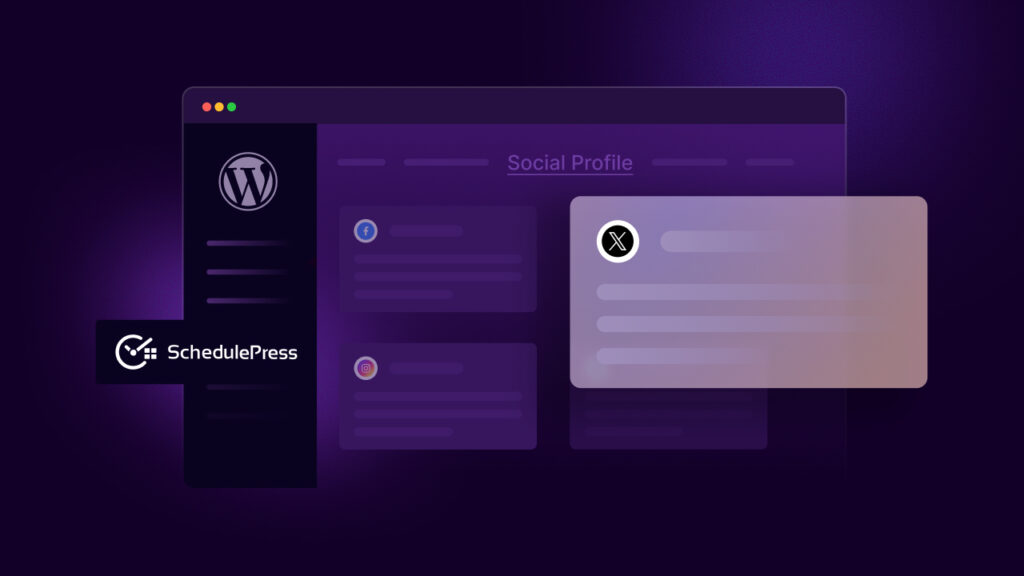
Next, go to SchedulePress → Settings → Social Profiles. Here you can connect your main social channels in just a few clicks: Facebook Pages & Groups, X (Twitter), LinkedIn Profiles & Company Pages, Pinterest, Instagram, Threads and Google Business Profile.
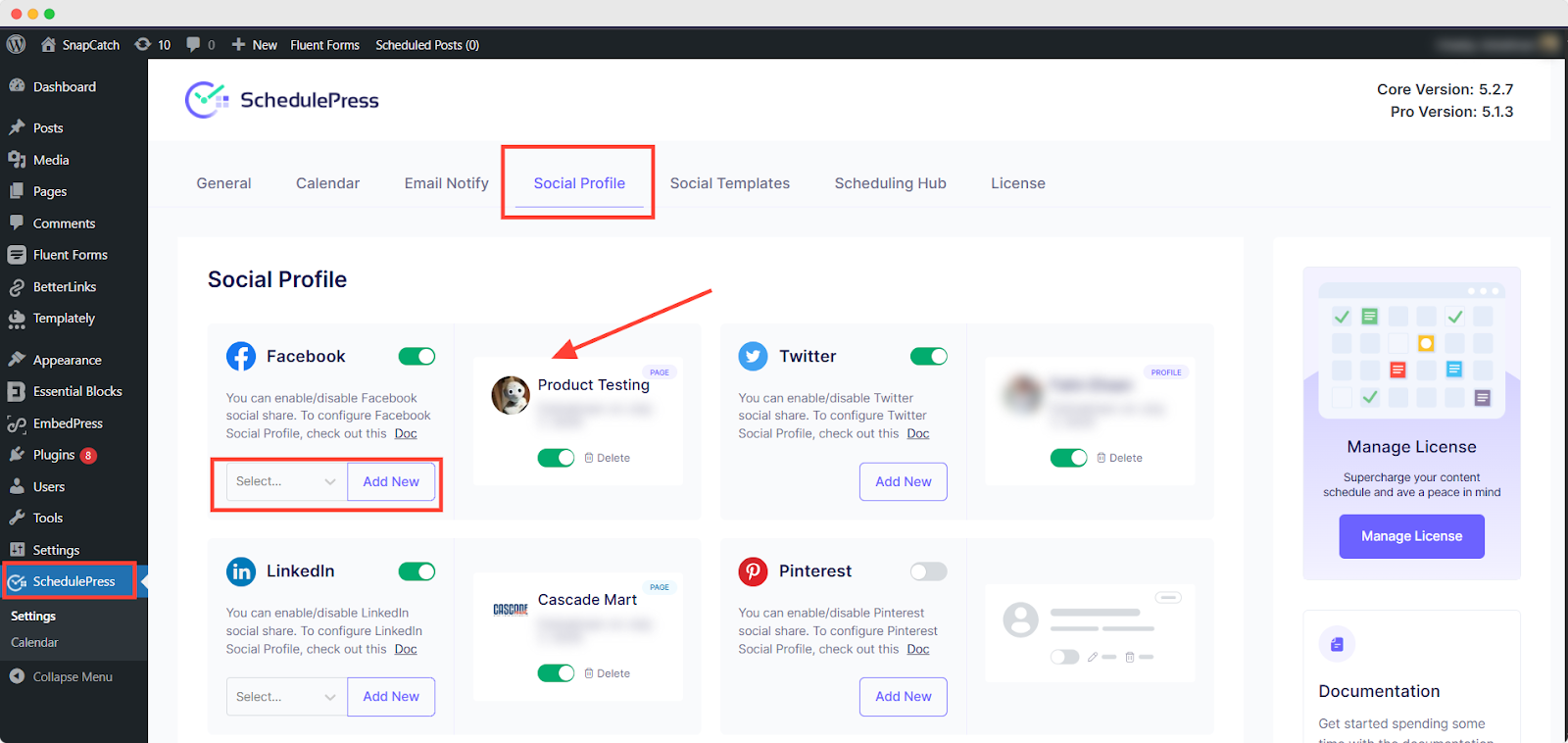
Authorize each platform once and SchedulePress remembers your connections for future posts. No more logging into five tabs every time you publish. This is where your multi-platform publishing workflow starts to feel real. One piece of content. Several channels. One control center.
Step 3: Plan and Create Content Around Your Blog Posts
With SchedulePress installed, your content planning becomes more intentional. Start with your upcoming blog posts — the core of your WordPress content strategy — and build your social ideas around them.
Ask yourself:
- What key takeaway can become a single post?
- Which section could be a multi-slide carousel?
- Is there a stat or quote that could work well on X or LinkedIn?
Document these ideas in your calendar or planning sheet. This is classic content repurposing: one article fueling multiple social posts. It keeps your feed active and lets your best content live longer.
Step 4: Add Platform-Specific Content in the WordPress Editor
Open a post in the WordPress editor and scroll down to the SchedulePress sharing box. This is where, with custom social templates, you prepare platform-specific content so every network gets its own tailored message.
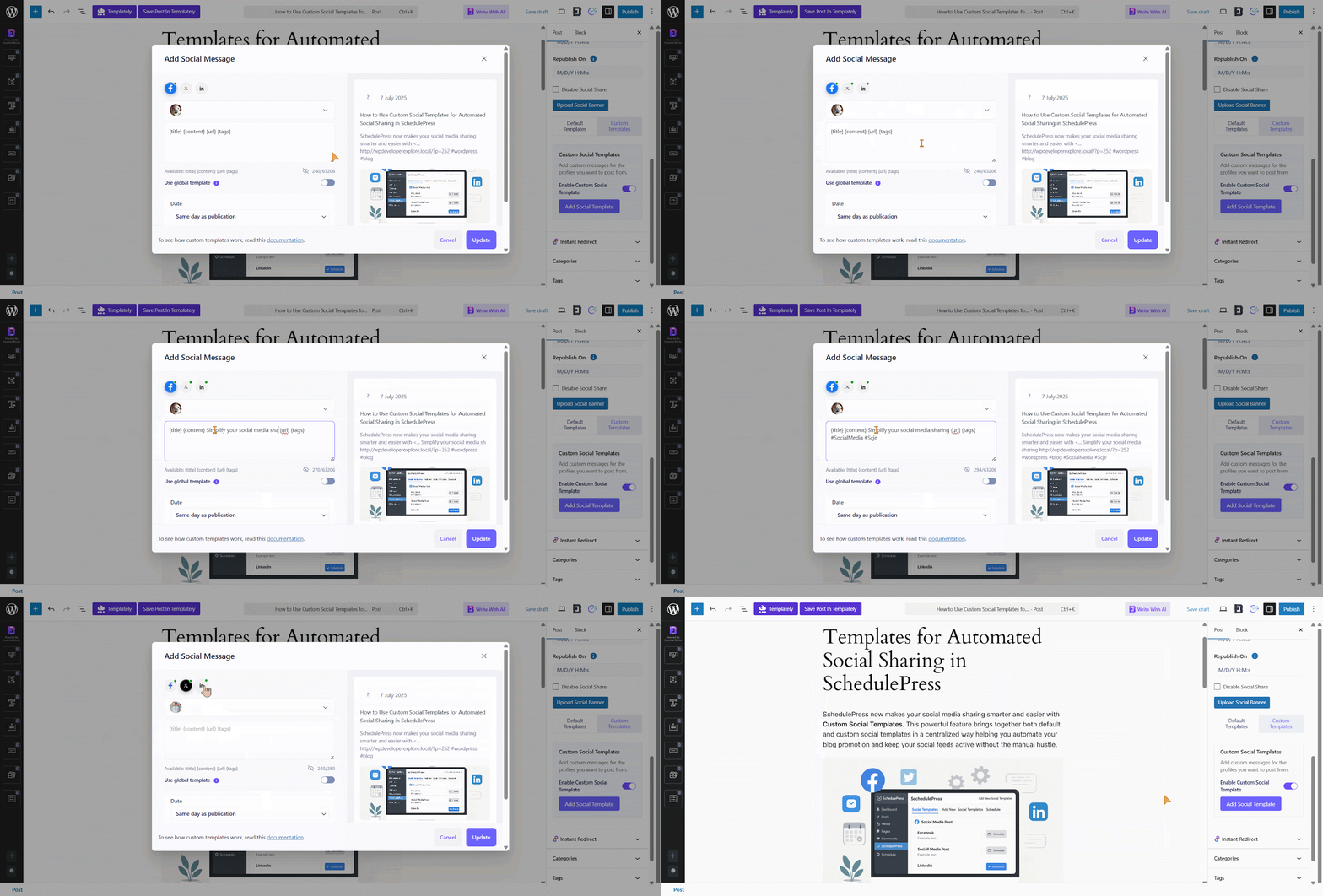
You might write a punchy one-liner for X, a more thoughtful paragraph for LinkedIn and a conversational caption for Facebook. All tied to the same blog post, all managed from one screen.
Step 5: Use Dynamic Social Templates to Save Time
If you post frequently, typing out similar captions again and again gets old fast. That is where SchedulePress social templates come in. Inside the settings, you can create reusable templates that use dynamic tags such as:
{title}– pulls the post title{excerpt}– inserts the post excerpt{url}– adds the permalink{tags}– converts selected tags into hashtags
For example, a template for X might look like: {title} — new on the blog 🔗 {url} #{tags}
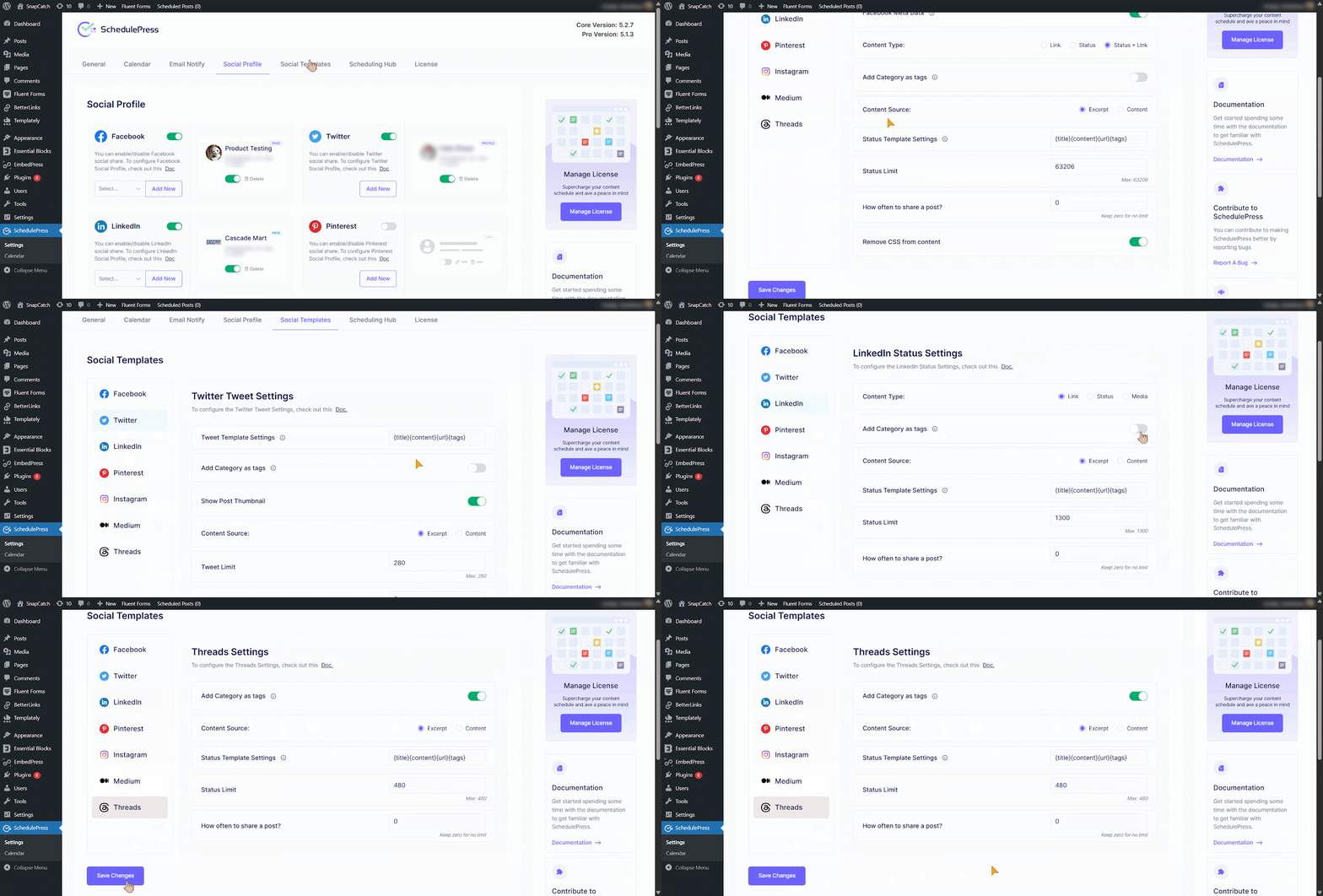
Every time you publish, SchedulePress automatically generates a caption based on that structure. The repetitive work is handled by social media automation, not your keyboard.
Step 6: Schedule Posts and Visualize Everything in the Calendar
Once your content and captions are ready, you can schedule your posts as usual in WordPress — choosing specific dates and times that line up with your content calendar planning. The real magic appears in the SchedulePress Calendar. This visual calendar shows:
- All upcoming and published posts
- Which days are content-heavy or content-light
- Where you might need more posts to support a campaign
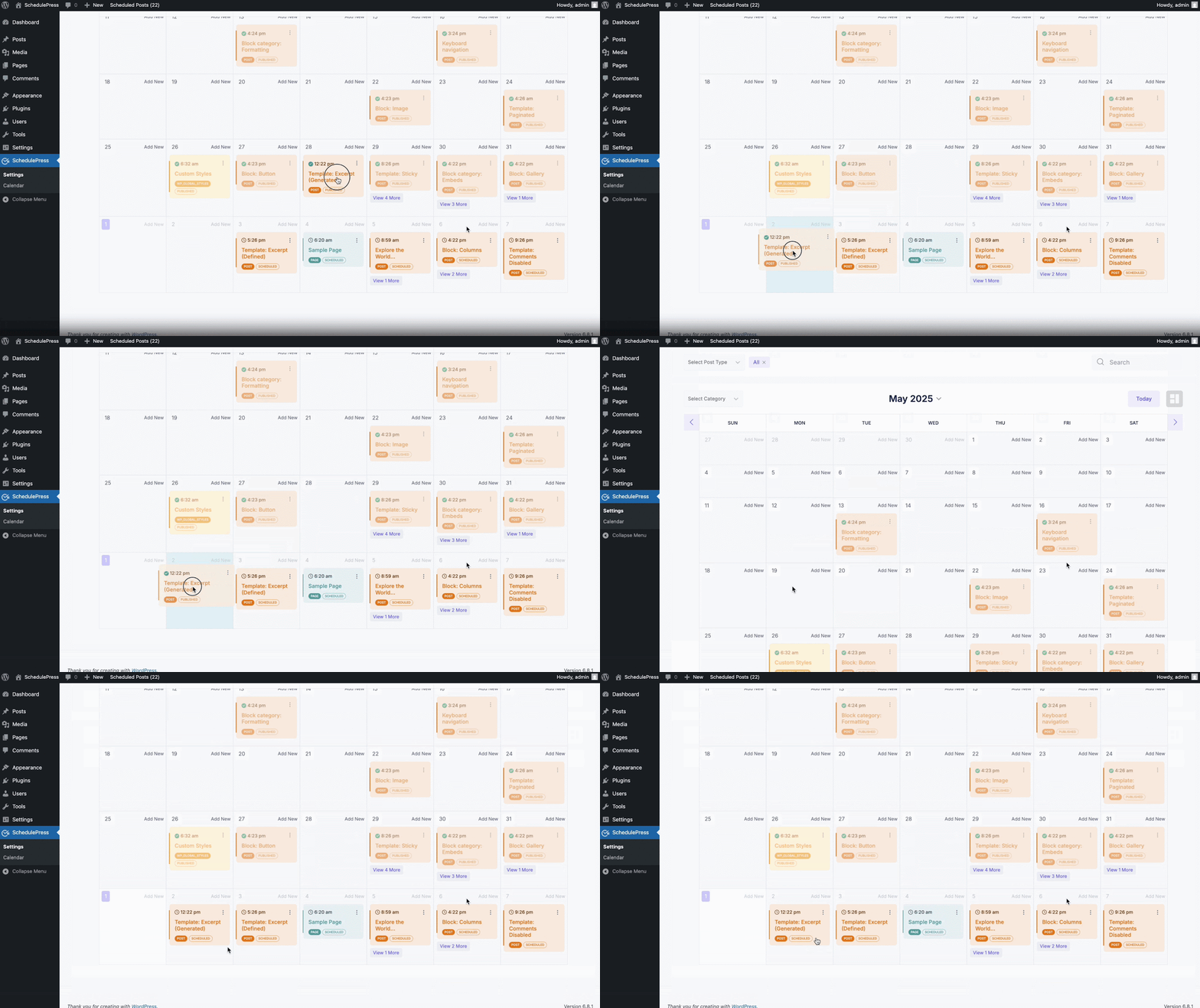
You can drag and drop posts to new dates if your plans change. Launch moved? No problem. Slide the post to match the new timeline and your multi-platform publishing schedule adapts with it.
Measure, Learn and Refine Your Strategy Over Time
A social media strategy is not something you set once and forget. It evolves as your audience, platforms and goals change. That is a good thing. It means you are paying attention. Use your analytics — from social platforms and tools like Google Analytics — to find the patterns:
- Which posts bring the most traffic to your site?
- What type of platform-specific content gets the most engagement?
- Which days or times perform best for your audience?
- Which formats (threads, carousels, short videos) tend to work?
Armed with this data, you can adjust your content calendar planning, shift priorities between networks, or double down on high-performing themes. SchedulePress helps here simply by keeping your publishing consistent, making it easier to compare results week over week.
Turn Your Social Media Content Strategy Into a System
Execution without strategy is noise. By combining thoughtful planning, smart content repurposing, and reliable social media automation, you create a system that supports your brand instead of draining it. Your WordPress blog becomes a content engine. Your social channels become well-organized distribution lines. And SchedulePress sits in the middle — connecting everything together.
If you have found this blog helpful, share your opinion with our Facebook community. You can subscribe to our blogs for valuable tutorials, guides, knowledge, tips, and the latest WordPress updates.